Typing Games
are designed to relax when you are bored with regular typing practice.
Click Typing Games button or menu (or press
short cut key) on main window.
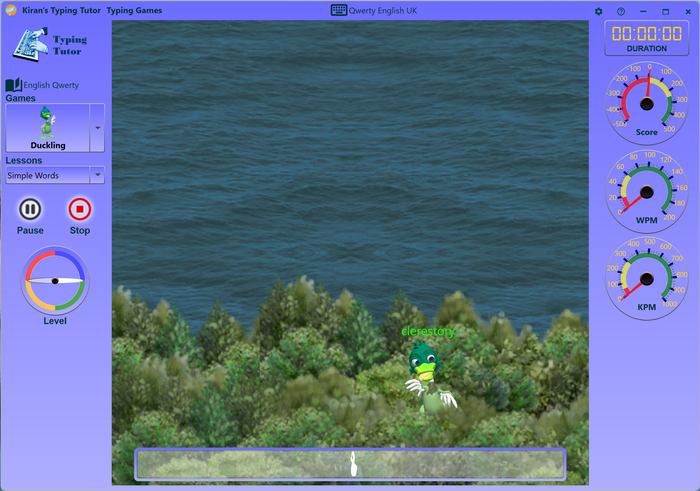
Select game from dropdown list
Click start button to start the game(or press F5)
Click pause button (or press F6)
Click stop button (or press F7)
To change game level, rotate the game level pointer.
Games
Duckling A naughty duck comes out of bushes with a word, you
need shoot it by typing the word in the text box before it hides in to bushes
again, if you miss the duck many times your game will be over and you need
to restart the game again
Invaders A group of alien invaders come from the sky
with their own words, you need to fire them by typing their words before they
touch the ground, If the invades touch the ground the game will be over you
need to restart the game again
Bombers A group of fighter jets fly on air, you need to fire
the missile against them by typing their words.
Balloons Balloons drops from top randomly with random
movements, you need burst them by typing their words.
You can also select additional texts from lessons dropdown.
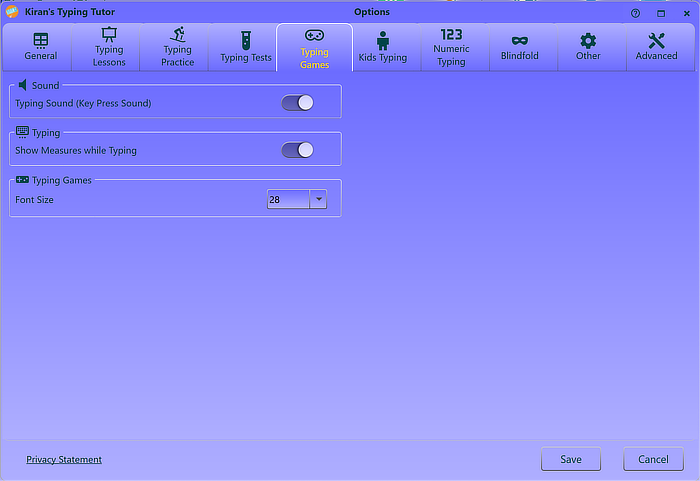
Click on options button and go to typing games tab
Options:
Sound
Typing sound
Key-press sound helps you to type in a rhythm; we recommend you to key-press sound on, this will encourage you to type faster.
Typing
Show measures while typing
Shows real-time measures (WPM, KPM and accuracy) while typing
Typing Games
Typing game font size
Sets font-size for the games, change the font size if the default one is not suitable.