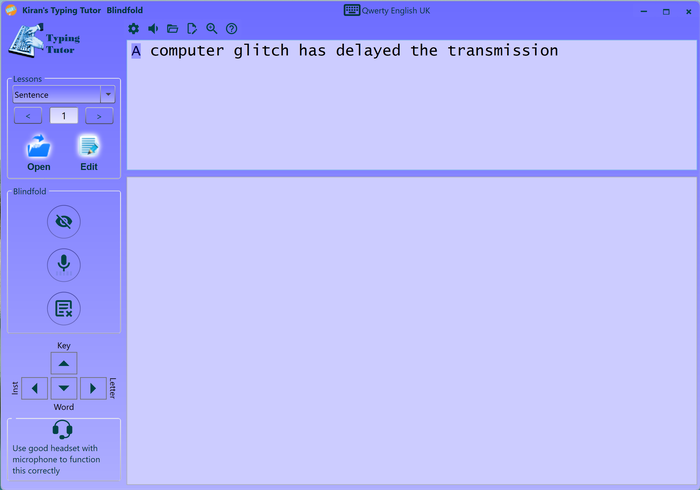
Blindfold window allows you to learn typing blind-folded.
Click on blindfold button on main-window or select blindfold menu from left-hand menu.
Blindfold training module is based on voice instructions and voice commands. Make sure the required voice packages are installed properly on your windows. Go to windows settings > speech and setup required language packages. Test voice input and make sure windows recognizes your voice properly. Blindfold requirs some level of touch-typing, do not try blindfold before your fingers find keys.
From left-hand panel, turn off the lesson view, turn on voice command .
Blindfold/close your eyes and start typing.
Also you can select your preferred voice instruction from the options menu.
When you do not know what to type, you can ask for instruction or key or letter or word using below tell me commands.
Blindfold only when it is safe to do so. Use only safe eye masks for blindfolding that can be easily removed.
Do not blindfold in unsafe environment or unattended.
Use good headset with microphone to function blindfold correctly otherwise there will be disturbance between voice commands and typing instructions.
Sometimes voice command listener may stop listening;
you may need to re-start it by unclicking and clicking the voice command (microphone) button on Blindfold window.
Blindfold Instructions
Typing Instruction
Key
Letter
Word
Sentence
Voice Commands
Tell me Instruction
Tell me Key
Tell me Letter
Tell me Word
Tell me Sentence
Move Next
Use voice command get to typing aid or hint while you are typing.
e.g. you can ask "Tell me letter" when you don't know what letter to type next.
Alternative to voice commands, you can use arrow keys to get voice instruction.
On some PCs, voice command listener may not work properly or interfere with audio instructions, turn-off voice commands and use arrow keys instead.
Arrow Key Commans
Left Key > Typing Instruction
Up > Key
Right > Letter
Down > Word
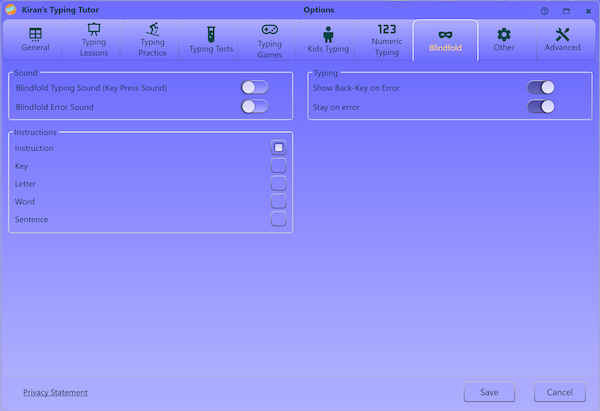
Sound
Blindfold typing sound
Key-press sound helps you to type in a rhythm; we recommend you to key-press sound on, this will encourage you to type faster.
Blindfold error sound
check for error beep
Audio
Audio help
No Audio help Gives no audio prompt for next key; check this if you prefer no audio help.
Say Character to be Typed tells next letter to be typed. this prompt will help you to build muscle memory.
Speak Type Instruction tells you typing instruction including what key needs to be pressed with what finger. This prompt will help you to build muscle memory faster.
Typing
Show back key on error
check for to show back key on error. (this is not required if you check below "Stay on error"
Stay on error
check for stay on typo/error. cursor stays on typo moves only when you type correctly.